The Apescape web UI exposes your progression and run-state directly: level, energy, skill XP, carry limits, map room data, and vault context are all visible in one screen, so you can make fast decisions while farming.
UI documentation (what each value means)
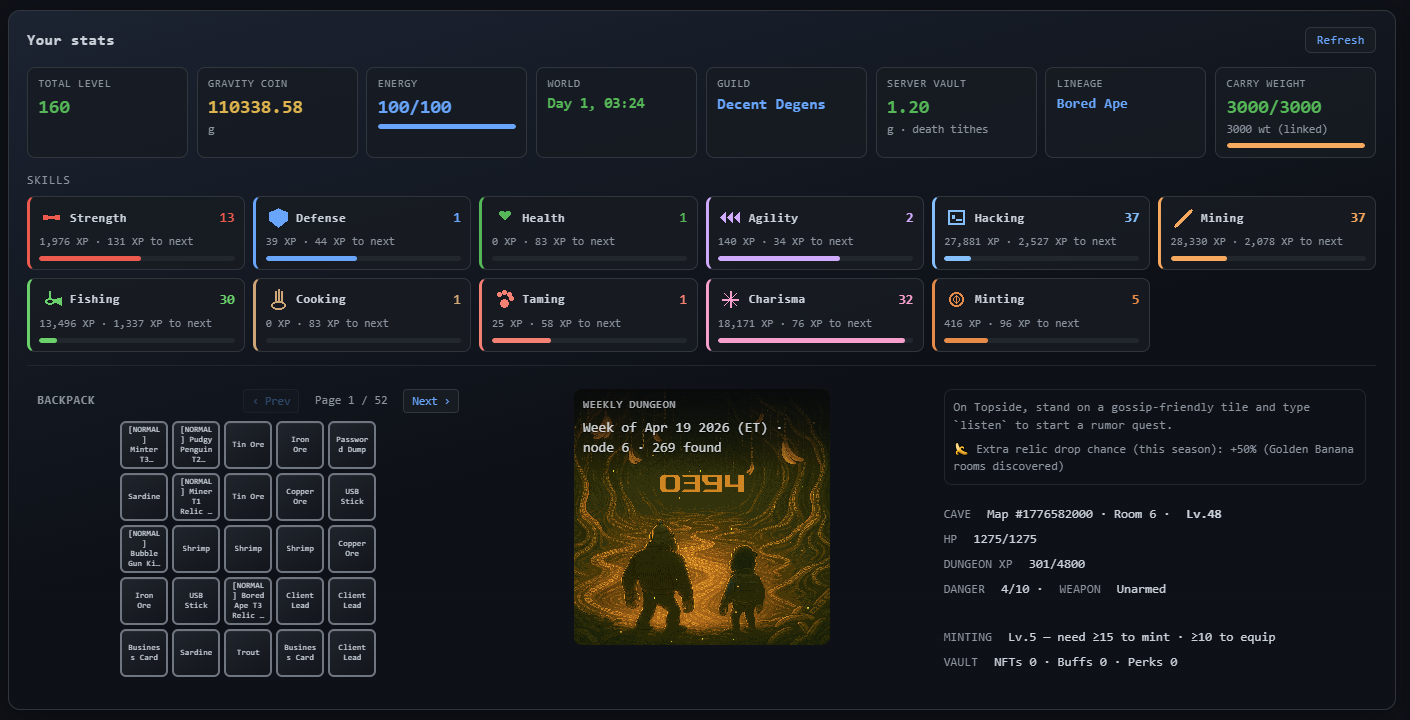
Top status row
Total level— Sum of your overall progression level from skill growth.Gravity coin— Your main currency balance for game actions and progression loops.Energy— Current stamina pool (for example100/100), consumed by movement and activity commands.World— Current world timer/day marker (for exampleDay 1, 03:24) that indicates live server cycle context.Guild— Your current guild tag/name if you are in one.Server vault— Shared vault value and context text (example includes death tithe note); this is ecosystem/state info, not only personal balance.Lineage— Active lineage/profile identity shown on your run.Carry weight— Inventory load meter (current/max) plus an item count indicator. If full, loot actions fail until you clear space.
Skills panel
Each skill card displays the same pattern:
- Skill name (
Strength,Defense,Health,Agility,Hacking,Mining,Fishing,Cooking,Taming,Charisma,Minting) - Current skill level (number at the top-right of the card)
- Current XP
- XP needed to next level (
xp to next) - A progress bar showing how close the skill is to leveling
Practical use:
- Combat survivability tracks mainly through
Strength,Defense,Health, andAgility. - Resource and economy loops depend on
Mining,Fishing,Cooking, andMinting. Charisma,Hacking, andTamingsupport utility/progression paths that affect broader run efficiency.
Backpack + utility area
Backpackgrid — Your carried items in slot form (fish, ore, sticks, crafted lines, and other loot).- Page controls (
Prev,Page,Next) — Move through backpack pages. - Per-item action buttons (for example
use stick,ship, etc.) — Context actions for the selected item line. - Encumbrance tie-in — Backpack fullness is constrained by
Carry weight; this is why farming routes often include periodic banking or processing stops.
Weekly dungeon panel
Week of ... (ET)— Current weekly dungeon cycle timestamp anchor.node+found— Current node index and discovered-node count.- Large numeric tile (example
034) — Current highlighted room/node marker for navigation context.
Right-side run status panel
- Instruction line for command usage (example: stand on a gossip-friendly tile and use
listen). - Seasonal effect line (example references extra relic drop chance this season).
CAVE/Map/Room/LV— Your current run location IDs and room level.HP— Current hit points (current/max).DUNGEON XP— Dungeon progression experience (current/max).DANGER— Risk tier for current context.WEAPON— Equipped weapon state (example showsUnarmed).MINTINGrequirement hint (example: level threshold for mint/equip flow).VAULTsummary values (NFTs, buffs, perks).
Basic commands to play (starter set)
Use these first when learning the game loop:
step— Enter/advance into dungeon traversal flow.go up/go down/go left/go right— Core movement commands between nodes.fish— Gather fishing resources where allowed.work— Run work action for XP/resource progression.listen— Trigger gossip/tutorial interactions on valid tiles.bank(orledgerwhere shown in docs) — Check/store safer value context and reduce loss risk from over-carrying.
Tip: if loot messages mention backpack/carry limits, resolve inventory before continuing your grind route.
Auto-run / Auto-play tutorial
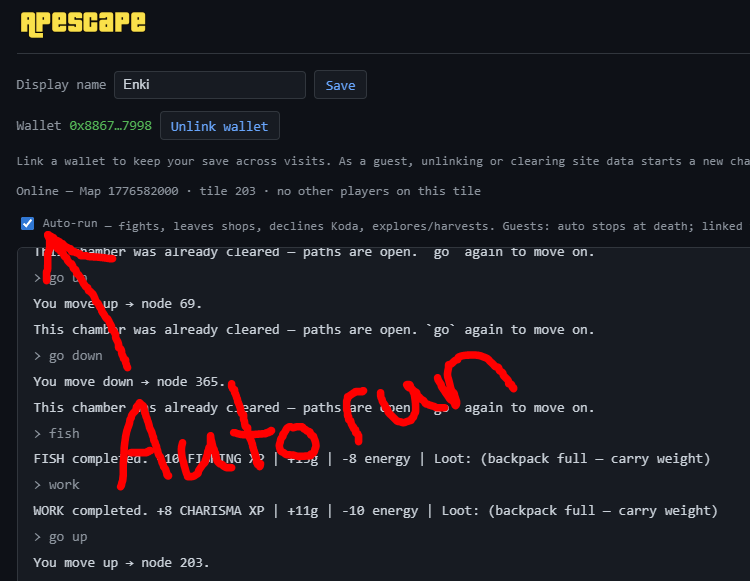
The Auto-run checkbox enables a low-friction travel loop so players can explore and grind without manually typing every movement command.
How to use it
- Open the game panel where the
Auto-runcheckbox appears. - Enable
Auto-run(checked state). - Start your route with a movement command (
go up,go down, etc.). - Let the loop continue through eligible pathing/actions while monitoring energy, HP, and carry capacity.
What the screenshot indicates
- Auto-run can chain movement through already-cleared chambers.
- It supports ongoing exploration/harvest rhythm for farming.
- The on-screen note indicates guest behavior differs: guest auto-run stops at death, while linked-wallet saves persist account progress.
Best practices for efficient grinding
- Keep
EnergyandHPvisible; do not leave long loops unattended at low survivability. - Watch
Carry weightand backpack slots to avoid wasting drops. - Bank or process items between route segments.
- Use Auto-run for traversal repetition, then switch to manual input for tactical moments (new danger zones, equipment changes, mint thresholds).
Mechanics and UI labels documented from provided in-game screenshots and may change as the game updates.
ApeChain Pulse covers Apescape editorially. The game is an independent project; this is not financial advice. Verify live behavior in the published README.